

JSON Data Type
The JSON data type allows you to store unstructured or semi-structured dynamic data directly within your domain entities. This is highly beneficial for storing things like configurations, flexible metadata, or user preferences without causing schema bloat.
Defining a JSON Property
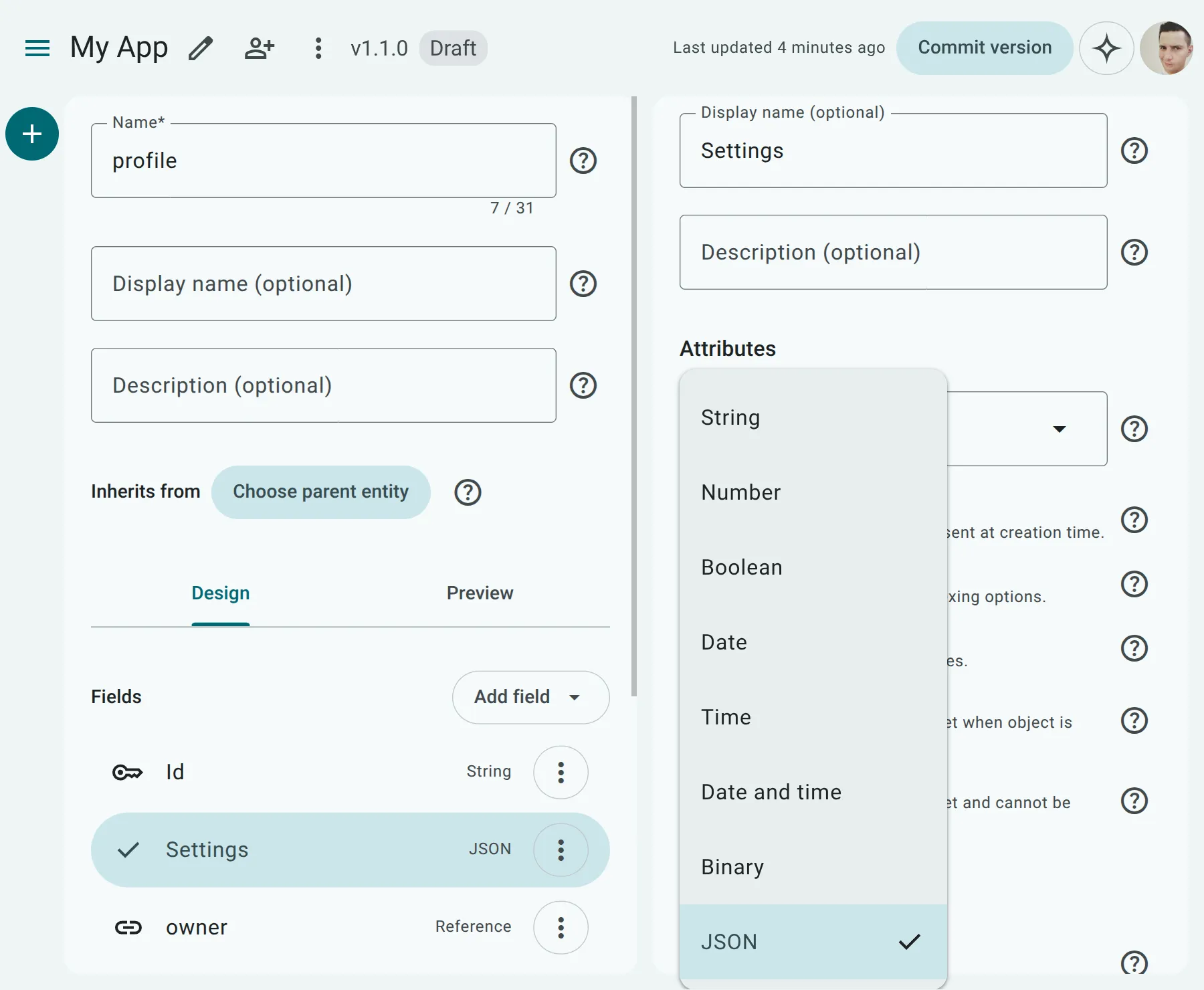
Section titled “Defining a JSON Property”To define a JSON property in the Data Modeler:
- Navigate to your Domain Entity.
- Add a new property and select JSON as the Data Type.
Options and Validation
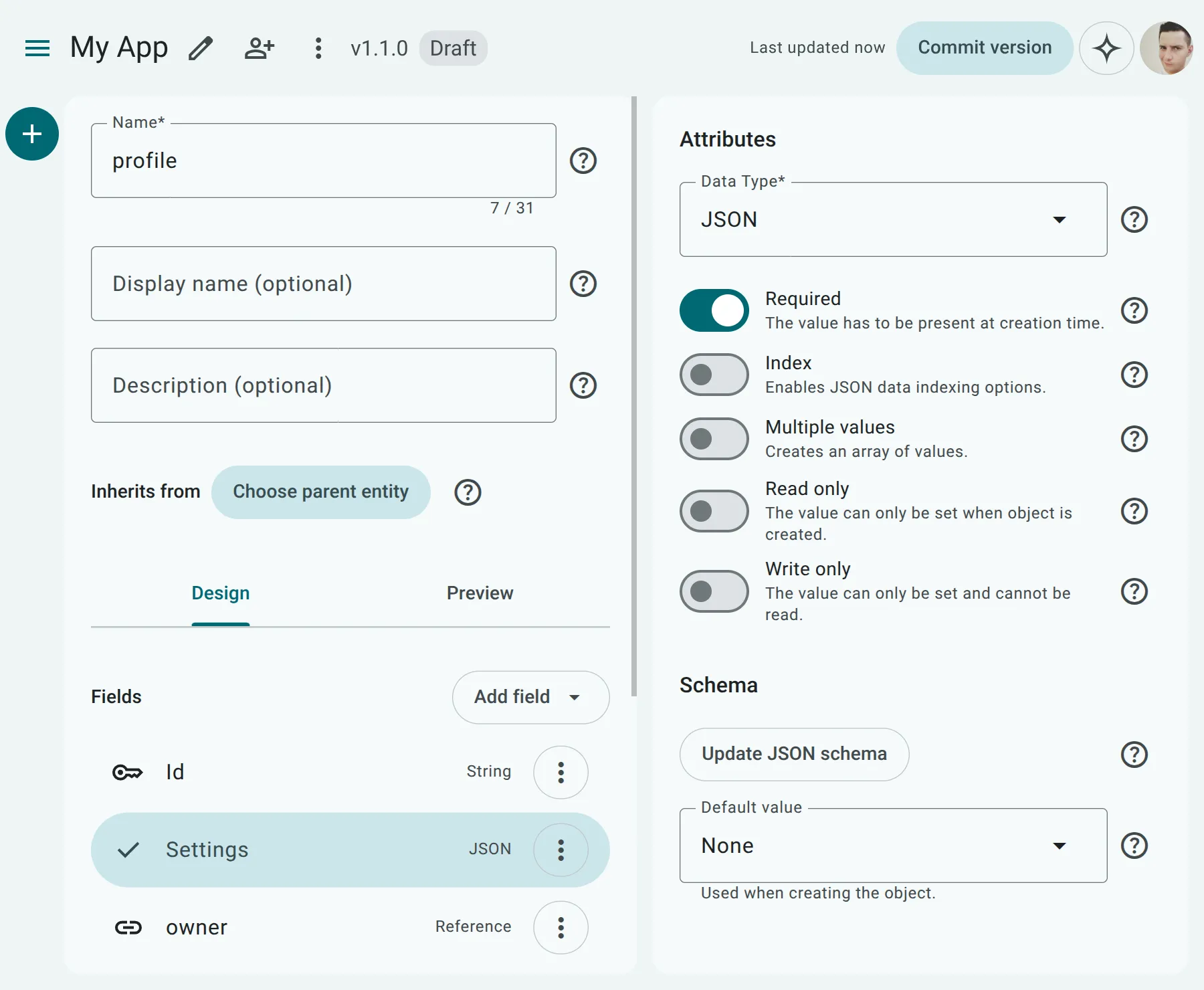
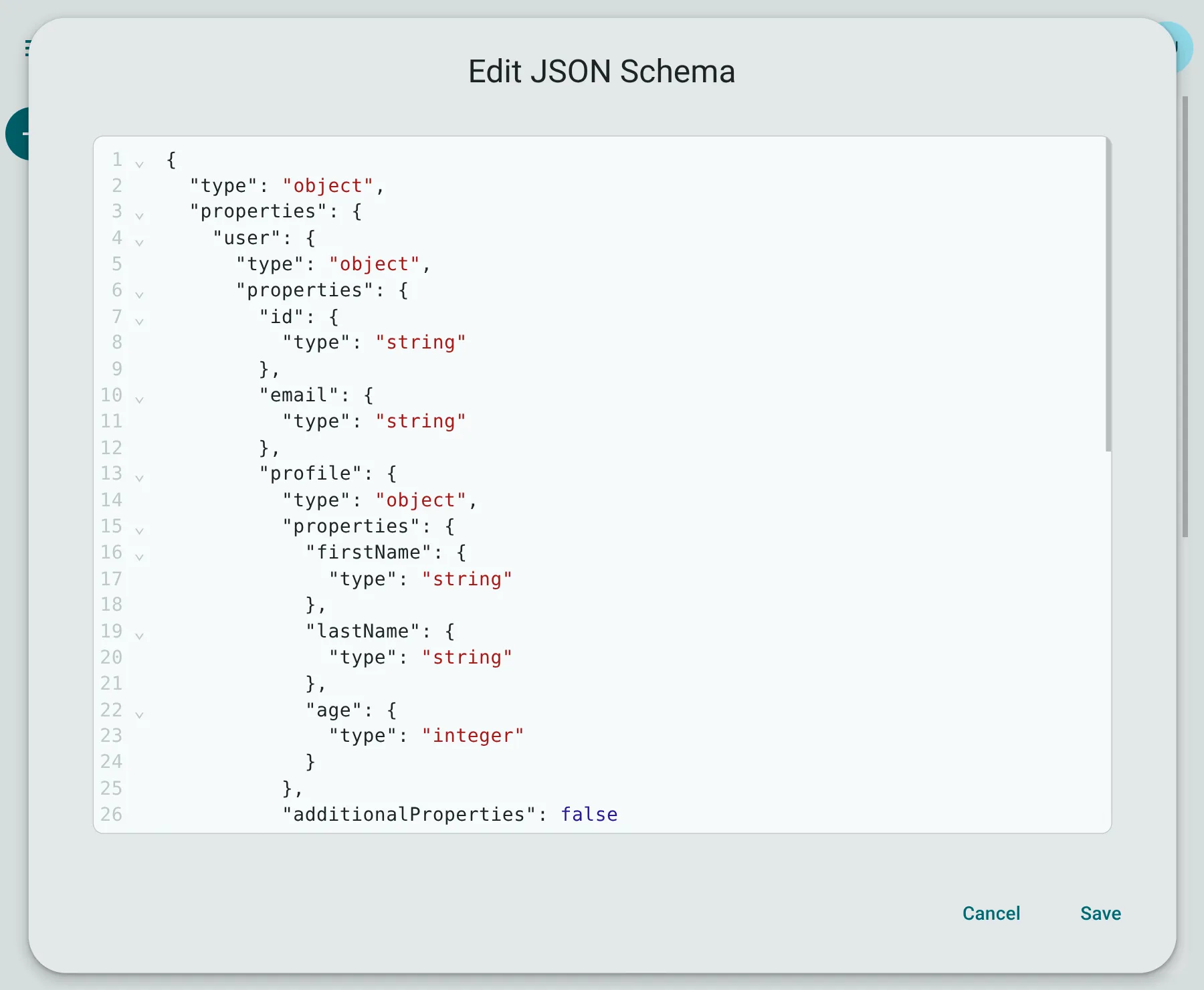
Section titled “Options and Validation”API Now! allows you to enforce structure on your flexible JSON payloads using JSON Schema.
In the Property Configuration panel, you can open the JSON Schema editor to input a valid schema. When records are created or updated, the runtime will validate incoming data against this schema and reject any payloads that do not conform.
Partial Updates (JSON Merge Patch)
Section titled “Partial Updates (JSON Merge Patch)”When executing a PATCH update on a domain entity with a JSON property, API Now! implements RFC 7396 JSON Merge Patch semantics. This allows you to perform deep, partial updates to nested structures without needing to send the entire JSON payload or perform read-modify-write loops.
JSON Merge Patch Rules:
Section titled “JSON Merge Patch Rules:”- Recursive Merging: Sending a nested object will merge its keys recursively with the existing data.
- Deleting Keys: Setting a key’s value to
nullin the payload deletes that key from the database JSON object. - Replacement of Non-Objects: If a property value is updated to a non-object type (such as an array or string), the value is completely replaced rather than merged.
Example Patch Request
Section titled “Example Patch Request”Given a user setting entity with an existing JSON config of:
{ "theme": "dark", "notifications": { "email": true, "push": false }}To update push to true and delete email from the document, you can send the following partial PATCH request:
PATCH /settings/1{ "config": { "notifications": { "push": true, "email": null } }}After the request, the database will store the merged result:
{ "theme": "dark", "notifications": { "push": true }}Indexing and Path Configuration
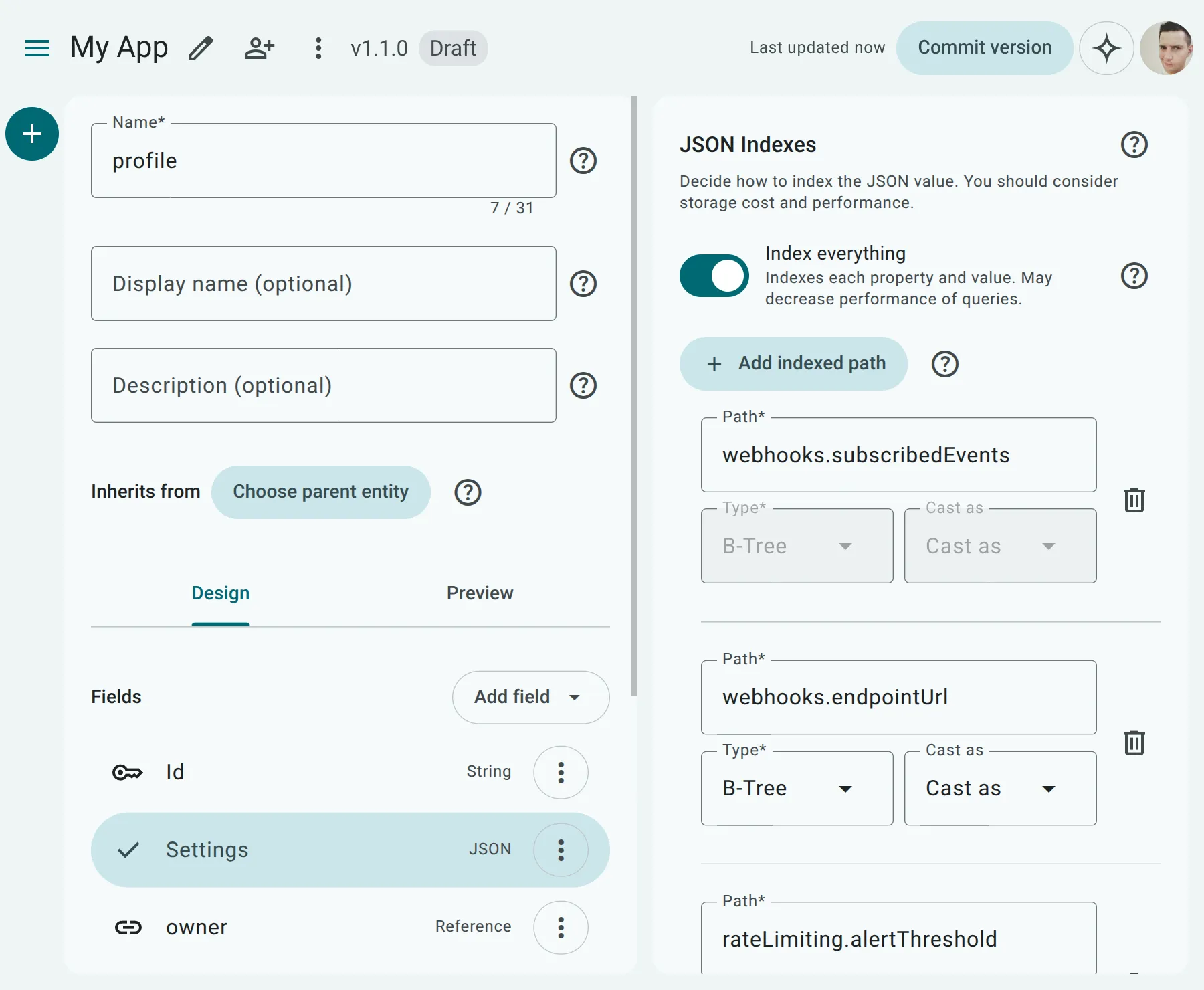
Section titled “Indexing and Path Configuration”Storing data in a JSON column is flexible, but by default, it can be slow to query. API Now! offers a Tiered Indexing Model giving you granular control over how JSON data is indexed for maximum performance.
Full Object Indexing (Tier A)
Section titled “Full Object Indexing (Tier A)”You can choose to index the entire JSON object.
- Best for: General ad-hoc querying where keys are dynamic.
- Capabilities: Supports containment and key existence checks at all nesting levels.
- What this means: Under the hood, API Now! generates a native PostgreSQL GIN (Generalized Inverted Index) on the JSON column. This indexes every key, sub-key, and value at any depth, enabling the database to immediately find matching records without a full table scan.
- Key Existence Checks: Verifies if a nested key is present in the document.
- Containment Checks: Verifies if the JSON document contains a specific sub-document structure (matching nested objects or array items).
- Trade-offs: Can result in larger index sizes and slower write performance due to indexing every key and value.
Schema Example
Section titled “Schema Example”To illustrate, consider a settings JSON property validated by the following schema:
{ "type": "object", "properties": { "theme": { "type": "string", "enum": ["light", "dark"] }, "notifications": { "type": "object", "properties": { "email": { "type": "boolean" }, "slackChannel": { "type": "string" } } }, "allowedIps": { "type": "array", "items": { "type": "string" } } }}Example List Queries
Section titled “Example List Queries”With Full Object Indexing (Tier A) enabled, you can perform fast List (GET) or Search (POST) queries at any nesting depth. Here are examples of how to query the above schema:
- Querying nested values: Filter users who prefer the dark theme.
GET /users?settings.theme[eq]=dark
- Querying nested booleans: Filter users with email notifications enabled.
GET /users?settings.notifications.email[eq]=true
- Searching with request payloads: Using the POST Search endpoint, you can combine nested filters:
POST /users/search{"where": {"and": {"settings.theme": {"eq": "dark"},"settings.notifications.email": {"eq": true}}}}
Path-Specific Indexing (Tier B)
Section titled “Path-Specific Indexing (Tier B)”For highly-queried nested properties, you can configure path-specific expression indexes.
- Best for: Specific paths you frequently use in sorting or range filters (e.g.,
score > 80). - How to configure: In the index settings, add specific dot-notation paths (e.g.,
address.cityormetadata.score). - Casting: You can specify a cast type (Text, Integer, Decimal, Boolean) for each path. This ensures that numeric range queries and sorting behave correctly at the database level.
- Performance: This keeps the index size extremely small and database writes lightning-fast while giving you full
ORDER BYand range filtering capabilities. - Array Limitations: You cannot create deep path indexes through array fields. You can index the array property itself (e.g.,
settings.allowedIps), but you cannot index a sub-property inside it (e.g.,settings.allowedIps.item). Attempting to traverse past or index a sub-property of an array will trigger the UI validation error:Cannot index a sub-property of an array..- Why options are disabled: When you index an array property, the Index Type and Cast as options are disabled in the UI. This is because:
- Index Type: Standard B-Tree indexing is not suited for searching or sorting array elements. Querying elements inside an array (such as testing if an element exists or if the array intersects another) requires a GIN index, so B-Tree options are disabled.
- Cast as: Casting (e.g., to
IntegerorBoolean) is meant for ordering or range-filtering singular, scalar values. Because an array represents a collection of values, casting the entire array to a primitive database type is invalid.
- Why options are disabled: When you index an array property, the Index Type and Cast as options are disabled in the UI. This is because:
Limitations
Section titled “Limitations”While the JSON data type is incredibly powerful, keep the following in mind:
- Foreign Keys: You cannot create associations (Foreign Keys) directly to or from nested JSON properties. Associations must be created on the entity level.
- Database Support: The underlying implementation uses native PostgreSQL
jsonbcolumns, meaning it inherits PostgreSQL’s specific operational limits for maximum document size (typically 1GB per column, but keeping payloads small is highly recommended for performance). - Projections: API Now! fully supports partial selection (include/exclude projections) of nested JSON keys. You can specify a dot-notation path (e.g.,
settings.notifications.email) to include or exclude specific properties inside the JSON object, and the runtime will automatically prune the JSON payload before returning it to the client. - Array Indexing: In path-specific indexing (Tier B), you cannot traverse into or index sub-properties of array fields.