

Email (Semantic Module)
The Email semantic module is used to represent a verified internet email address. In typical development, developers must write complex regular expressions to validate email structures and normalize casing. The Email module enforces this structure automatically at the API Gateway before any data reaches the database.
Technical Specifications
Section titled “Technical Specifications”| Attribute | Specification |
|---|---|
| Data Type | String |
| Normalization | Values are automatically converted to lowercase |
| Validation Standard | RFC 5322 regex checks |
Automatic Backend Actions
Section titled “Automatic Backend Actions”1. Case Normalization
Section titled “1. Case Normalization”To prevent duplicate account conflicts (such as Alice@example.com and alice@example.com registering as separate users), the Serverless Engine automatically converts all email inputs to lowercase before checking uniqueness constraints or writing to PostgreSQL.
2. Format Enforcement
Section titled “2. Format Enforcement”Every write operation (POST, PUT, or PATCH) validates the email format. If the format does not conform to a valid email structure (e.g., missing an @ symbol or domain name), the request is rejected with a validation error.
Combining with Username
Section titled “Combining with Username”In many application architectures, the user’s email address also serves as their login identifier. You can apply both the Email and Username semantic tags to the same property.
When combined:
- Format Validation: The platform enforces that any input matches a valid email address format.
- Uniqueness: The platform enforces database-level uniqueness, preventing two users from signing up with the same email. This happens even when the data property is not marked as
uniquein the Data Domain model. - Authentication Routing: The authentication gateway recognizes this field as the login credential for your
UsernamePasswordsign-in flows.
Configuration Options
Section titled “Configuration Options”When applying the Email semantic module in the Domain Modeler, you can customize validation parameters in the property configuration panel:
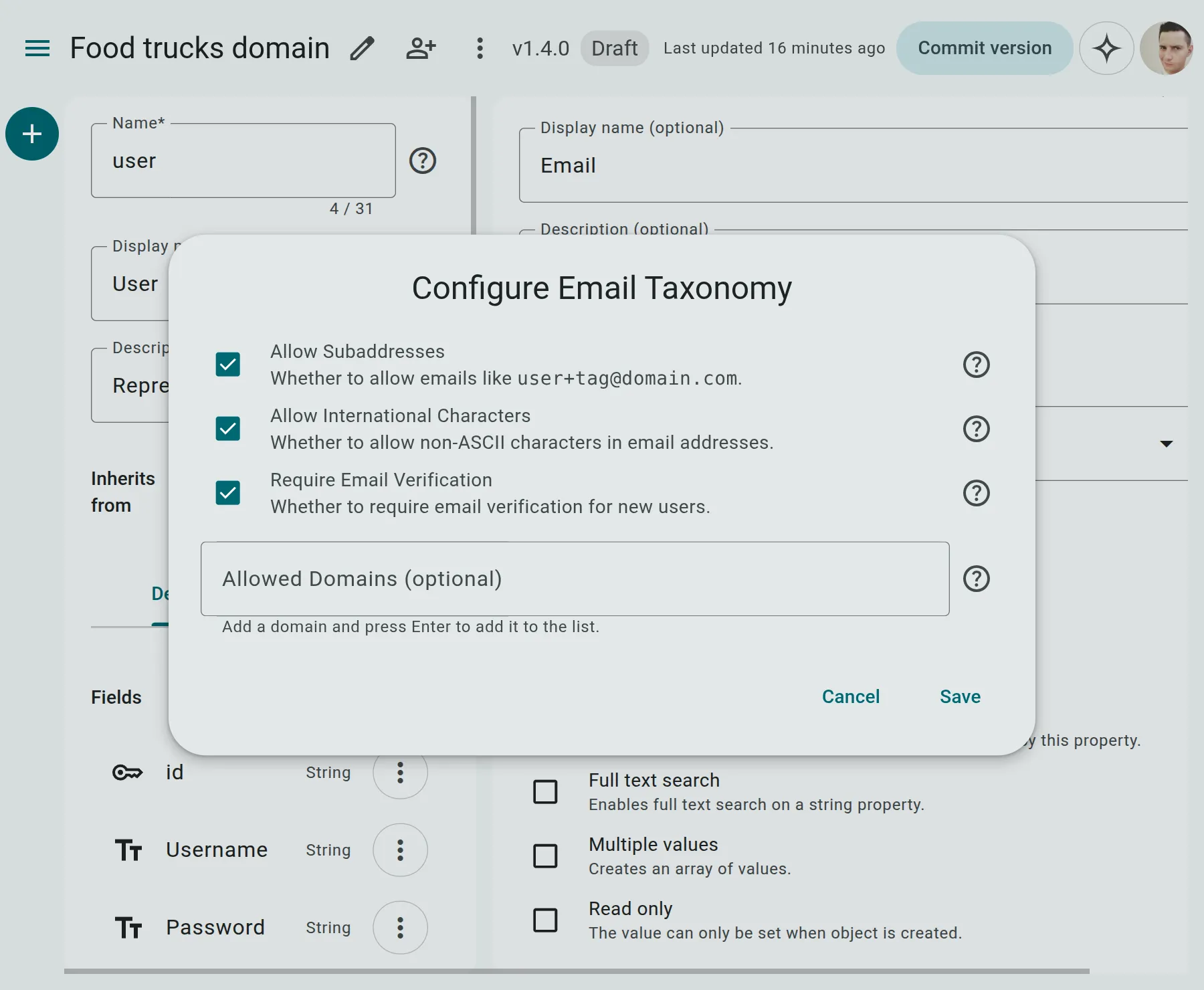
- Allowed Domains: A list of specific domains (e.g.,
['company.com']) that are permitted. When configured, any email from a domain not in this list is rejected. - Disallowed Domains: A list of blocked domains (e.g., disposable email domains like
['tempmail.com']). - Require Verification: If enabled (default:
true), requires the user to complete verification before the email is marked active in the system. - Allow Subaddressing: If enabled (default:
true), permits tags appended with a plus sign (e.g.,user+tag@domain.com). - Allow International Characters: If enabled (default:
true), allows non-ASCII characters in the domain name (e.g.,user@münchen.deoruser@café.comconforming to standard RFC 6531).
API Lifecycle Example
Section titled “API Lifecycle Example”Sending a Registration Request
Section titled “Sending a Registration Request”A client attempts to register an account with mixed capitalization:
POST /auth/register{ "email": "ALICE.smith@Example.COM", "password": "SecurePassword123!"}Server Response (Normalized Output)
Section titled “Server Response (Normalized Output)”The server responds with the normalized, lowercase email address:
{ "data": { "id": "usr_781290", "email": "alice.smith@example.com", "created_at": "2026-06-28T12:21:00Z" }}Validation Rules & Errors
Section titled “Validation Rules & Errors”- Alignment Error: You cannot apply the
Emailsemantic module to a non-string property (such asDateorNumber). Doing so yields a Semantic Data Alignment [Error] during lint checks. - Format Error: If the client provides an invalid email structure, the server immediately returns a
400 Bad Requestpayload:{"error": "Validation Failed","details": [{"field": "email","message": "Value 'alice.smith@com' is not a valid email address."}]}