

UserRole (Semantic Module)
The UserRole semantic module designates a database property as the permission role of a user within the system. It informs the Serverless Engine which field to inspect when evaluating Role-Based Access Control (RBAC) rules.
Applying this semantic to your user table’s role property automatically wires it into the platform’s security and validation engines, preventing unauthorized privilege escalation.
Technical Specifications
Section titled “Technical Specifications”| Attribute | Specification |
|---|---|
| Scope | Property (Applied to a field/column within an entity) |
| Data Type | String (typically configured with an enum list of allowed roles) |
| Write Behavior | Protected from self-mutation; requires administrative privileges to modify |
| Read Behavior | Readable via API, used for session context and authorization checks |
Automatic Backend Actions
Section titled “Automatic Backend Actions”1. Registration Defaulting & Stripping
Section titled “1. Registration Defaulting & Stripping”During registration (via POST /auth/register), the platform restricts who can assign roles:
- Payload Stripping: By default, any role submitted in a registration request is aggressively stripped from the payload. The runtime forces the user’s role to match the property’s configured
schema.defaultValue.value(e.g.,'viewer'). - Exceptions: If the role is explicitly allowed in the
allowRegisterWithRolesconfiguration, the submitted role will be accepted.
2. Privilege Escalation Fencing
Section titled “2. Privilege Escalation Fencing”The validation pipeline protects this field from unauthorized manipulation:
- Self-Mutation Blocked: A user can never modify their own role, even if they are currently an administrator. This eliminates self-escalation vulnerabilities and prevents accidental self-lockout.
3. Administrative Modification Controls
Section titled “3. Administrative Modification Controls”To change another user’s role (e.g., via PUT or PATCH), the platform checks authorization using one of two methods:
- Configured Administrators: If the
administratorsarray is defined in the semantic’s configuration, only users with a role in that list can modify another user’s role. - Implicit Enum Hierarchy: If the
administratorslist is omitted or empty, the runtime falls back to evaluating the property’senumorder as a privilege hierarchy (where index0represents the lowest privilege). An actor can only assign a role to a target user if the target role’s index is less than or equal to their own role’s index.
4. RBAC Authorization Anchor
Section titled “4. RBAC Authorization Anchor”The field tagged with UserRole serves as the absolute source of truth for Role-Based Access Control (RBAC). When the runtime processes an endpoint protected by a matchUserRole rule, it extracts the value of this property from the authenticated user’s session and verifies whether it matches the permitted roles. If there is no match, the runtime immediately returns a 403 Forbidden response.
Configuration Options
Section titled “Configuration Options”When configuring a property tagged with the UserRole semantic module, you can specify the following parameters in the Domain Modeler:
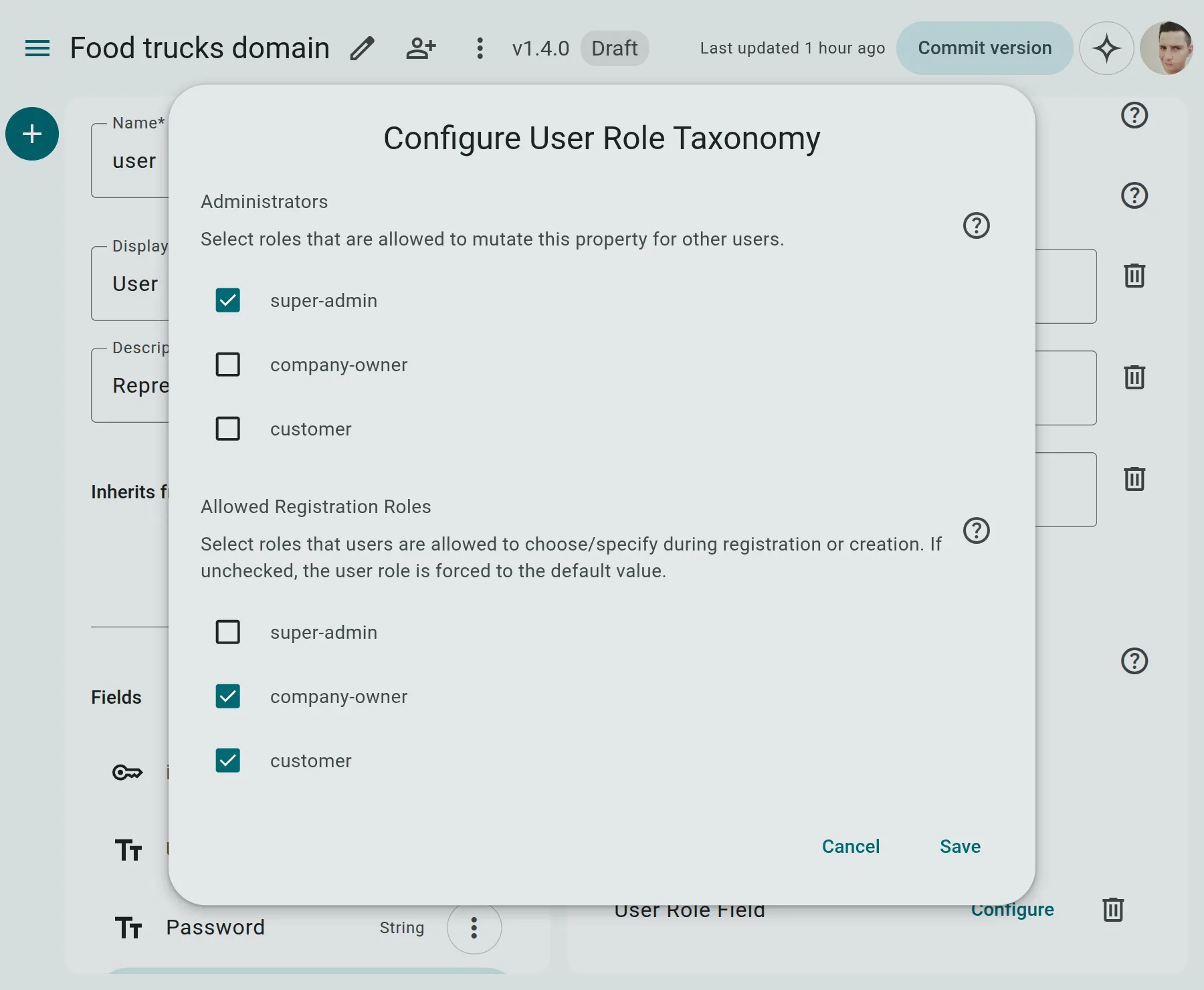
- Administrators (
administrators): A list of roles (e.g.,['admin']) permitted to modify this property for other users. - Allow Register With Roles (
allowRegisterWithRoles): A list of roles (e.g.,['customer', 'guest']) that can be safely assigned by a user during self-registration without being stripped.
API Lifecycle Examples
Section titled “API Lifecycle Examples”1. Standard Self-Registration (Request)
Section titled “1. Standard Self-Registration (Request)”A new user registers via /auth/register. They attempt to specify the admin role:
POST /auth/register{ "email": "new_user@example.com", "password": "SecurePassword123!", "role": "admin"}Server Response (Stripped to Default)
Section titled “Server Response (Stripped to Default)”Since admin is not in allowRegisterWithRoles, the platform strips it and falls back to the default role (viewer):
{ "data": { "id": "usr_823190", "email": "new_user@example.com", "role": "viewer", "created_at": "2026-06-28T13:30:00Z" }}2. Privilege Escalation Attempt (Request)
Section titled “2. Privilege Escalation Attempt (Request)”An authenticated administrator tries to change their own role to something else, or a non-admin tries to change someone else’s role:
PATCH /users/usr_823190{ "role": "admin"}Server Response (403 Forbidden)
Section titled “Server Response (403 Forbidden)”The server rejects self-mutation or unauthorized modification, returning an RFC 9457 Problem Details payload:
{ "type": "https://docs.apinow.app/errors/forbidden", "title": "Authorization Denied", "status": 403, "code": "AUTHORIZATION_DENIED", "detail": "You are not authorized to modify user roles or mutate your own role.", "instance": "/users/usr_823190"}Bootstrapping & CLI Administration
Section titled “Bootstrapping & CLI Administration”Because of the strict registration defaulting and privilege escalation fencing, it is impossible for a user to self-register as an administrator via the public API (unless their role is explicitly permitted under allowRegisterWithRoles, which creates a significant security risk).
To solve this bootstrapping problem and allow system administrators to escalate privileges or manage users, the platform provides a dedicated CLI tool. This command operates directly on the runtime database, bypassing the standard API level validation and security rules.
An administrator can run the apinow runtime users update command to update any property (including UserRole) of a user record:
CLI Command Format
Section titled “CLI Command Format”apinow runtime users update [options]Options & Help Output
Section titled “Options & Help Output”Usage: apinow runtime users update [options]
Update properties of a user directly in the runtime database
Options: --api <api> API file ID or slug --user-id <userId> Primary key of the user record to update --property <name=value...> Properties to update in the format name=value (can specify multiple) --org <oid> Organization ID (defaults to configured org) --env <environment> Target environment (e.g. "production", "staging") (default: "production") --api-url <url> Override target API server base URL --format <format> Output format: text, json --debug Enable debug/verbose logging -v, --verbose Enable verbose logging -h, --help display help for commandExample Usage
Section titled “Example Usage”To escalate a user’s role to admin in the production environment:
apinow runtime users update --api my-api-slug --user-id usr_823190 --property role=adminValidation Rules & Errors
Section titled “Validation Rules & Errors”- Alignment Error: You must apply the
UserRolesemantic module to aStringproperty. Applying it to numeric, date, or boolean properties results in a Semantic Data Alignment [Error] during domain linting. - Unrecognized Role Error: Any value written to this field must exist in the property’s base
enumdefinition. Submitting a role likesuper_userwhen the enum only allows['admin', 'viewer']will be rejected with an RFC 9457 Validation Error payload:{"type": "https://docs.apinow.app/errors/validation","title": "Validation Error","status": 422,"code": "VALIDATION_ERROR","detail": "Field validation failed","instance": "/users/usr_823190","errors": [{"detail": "Value 'super_user' is not a valid role. Allowed roles are: admin, viewer.","pointer": "/role","code": "validation"}]}