

Username (Semantic Module)
The Username semantic module represents a unique login handle used to identify users during session authentication. It automatically handles uniqueness checks and case normalization at the database level.
Technical Specifications
Section titled “Technical Specifications”| Attribute | Specification |
|---|---|
| Data Type | String |
| Normalization | Values are automatically converted to lowercase |
| Uniqueness | Strictly Enforced (Database-level UNIQUE index) |
Automatic Backend Actions
Section titled “Automatic Backend Actions”1. Case Normalization & Uniqueness
Section titled “1. Case Normalization & Uniqueness”To prevent collision issues where users register identical usernames using different cases (e.g. JohnDoe vs johndoe), the Serverless Engine automatically normalizes all inputs to lowercase before checking uniqueness. An index is applied to ensure that no two user records can share the same username value.
2. Login Identification Routing
Section titled “2. Login Identification Routing”Tagging a property with Username establishes it as the target lookup field when executing UsernamePassword sign-in credentials. When an authentication request is processed, the authentication gateway queries this column to locate the user’s record.
Recommended Property Attributes
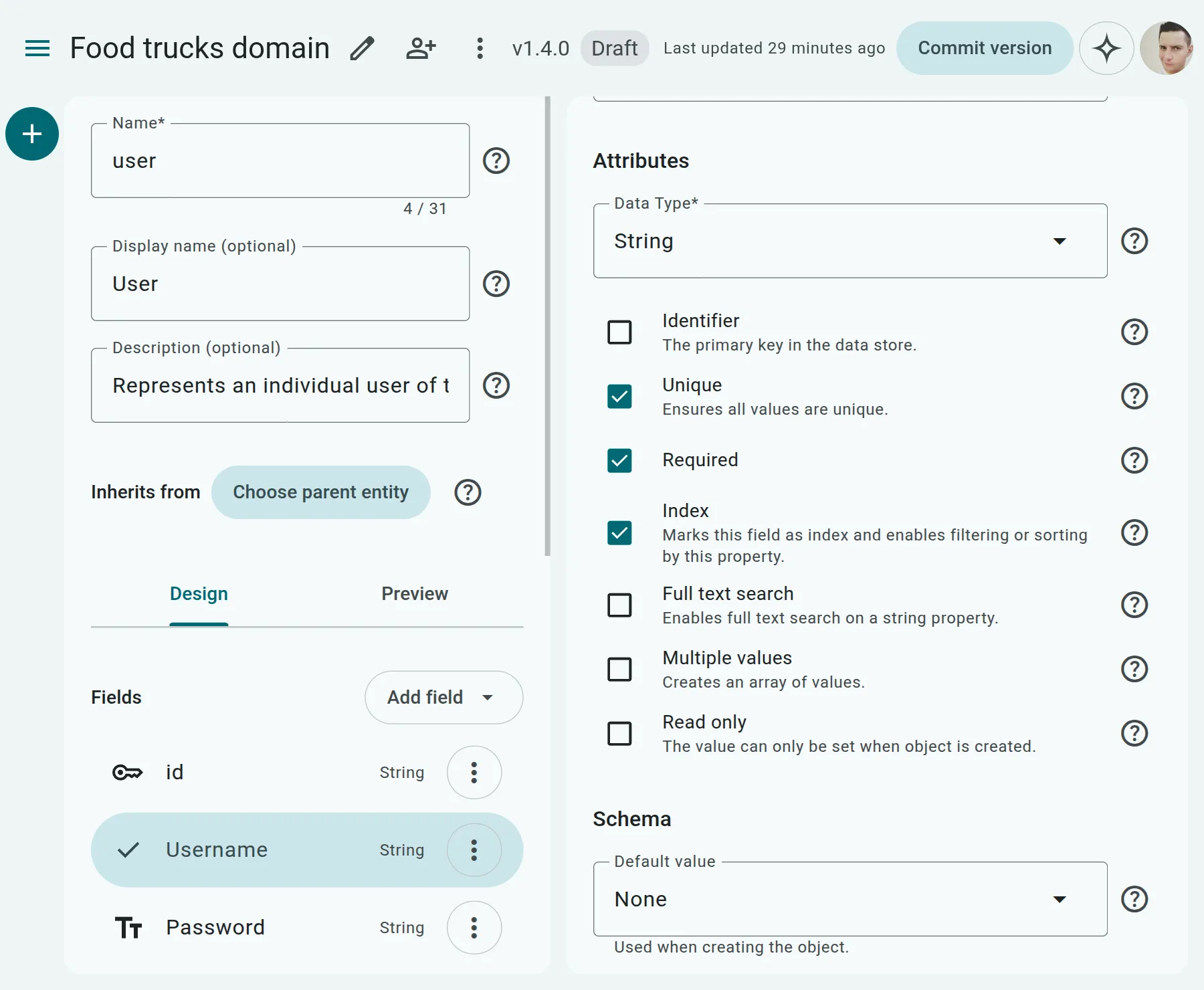
Section titled “Recommended Property Attributes”When configuring a property tagged with the Username semantic module in your Domain Modeler, it is highly recommended to set the following property attributes:
- Unique: Enable this attribute. Even though the Serverless Engine automatically enforces database-level uniqueness for
Usernameproperties, explicitly modeling it as unique keeps your visual blueprints and API client schemas clear and correct. - Required: Enable this attribute. Usernames are vital identity tokens; there should be no default values, and the field must not be nullable.
- Index: Enable indexing on this property. Since the username is queried frequently during login actions, indexing it guarantees optimal performance for lookup queries.
Combining with Email
Section titled “Combining with Email”In many applications, the email address is used directly as the login username. Instead of creating two separate database properties, you can apply both the Username and Email semantic tags to a single property (e.g. email).
When combined:
- The input must pass RFC-compliant email formatting checks.
- The email is normalized and checked for strict database-level uniqueness.
- The field is exposed as the authentication identifier.
For details, see the Email Semantic Module.
API Lifecycle Example
Section titled “API Lifecycle Example”Registering a User (Request)
Section titled “Registering a User (Request)”POST /auth/register{ "username": "CoolBuilder99", "password": "SecurePassword123!"}Server Response (Normalized Output)
Section titled “Server Response (Normalized Output)”{ "data": { "id": "usr_556122", "username": "coolbuilder99", "created_at": "2026-06-28T12:50:00Z" }}Validation Rules & Errors
Section titled “Validation Rules & Errors”- Alignment Error: You must apply the
Usernamesemantic module to aStringproperty. Applying it to numeric or boolean columns results in a Semantic Data Alignment [Error] during lint validation. - Collision Error: If a client attempts to sign up with a username that is already taken, the database will reject the operation with a uniqueness conflict:
{"error": "Conflict","message": "The username 'coolbuilder99' is already registered."}